
• 診所病歷e化
  • 醫聖診療系統軟體特色
  • 簡訊傳送系統
    使用者IP位置 216.73.216.59

    軟體操作

    健保IC卡個案[身分證號/生日]上傳資料錯誤如何修改再補正上傳

    分類:優化功能 日期: Warning: strtotime(): It is not safe to rely on the system's timezone settings. You are *required* to use the date.timezone setting or the date_default_timezone_set() function. In case you used any of those methods and you are still getting this warning, you most likely misspelled the timezone identifier. We selected the timezone 'UTC' for now, but please set date.timezone to select your timezone. in /volume1/web/content-detail.php on line 165 Warning: strtotime(): It is not safe to rely on the system's timezone settings. You are *required* to use the date.timezone setting or the date_default_timezone_set() function. In case you used any of those methods and you are still getting this warning, you most likely misspelled the timezone identifier. We selected the timezone 'UTC' for now, but please set date.timezone to select your timezone. in /volume1/web/content-detail.php on line 165 Warning: date(): It is not safe to rely on the system's timezone settings. You are *required* to use the date.timezone setting or the date_default_timezone_set() function. In case you used any of those methods and you are still getting this warning, you most likely misspelled the timezone identifier. We selected the timezone 'UTC' for now, but please set date.timezone to select your timezone. in /volume1/web/content-detail.php on line 165 Warning: date(): It is not safe to rely on the system's timezone settings. You are *required* to use the date.timezone setting or the date_default_timezone_set() function. In case you used any of those methods and you are still getting this warning, you most likely misspelled the timezone identifier. We selected the timezone 'UTC' for now, but please set date.timezone to select your timezone. in /volume1/web/content-detail.php on line 165 2022-10-15

    版本需求: 請用戶更新門診系統版次至12.149以上

    更版功能: 每日上傳作業優化功能


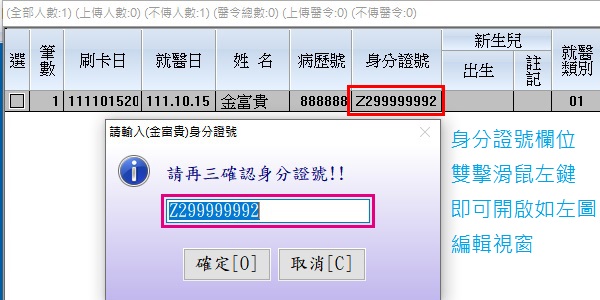
    ●『修改個案身分證』:於要修改的個案資料『身分證號』欄位上雙擊滑鼠左鍵

    會顯示『請再三確認身分證號!!』的輸入視窗,可重新輸入正確身分證號,再按下『確定』


    使用時機:健保資訊網服務系統(VPN)就醫資料檢核查詢結果,出現錯誤原因為『A12:05』或『A13:05』
    因資料庫存法不同,若IC上傳出現此錯誤時,用戶可使用此方式修正完成後,再重新補正上傳


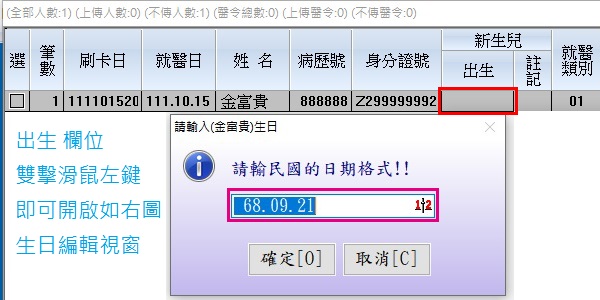
    ●『修改病患生日』:於要修改的個案資料『出生』欄位上雙擊滑鼠左鍵

    會顯示『請輸民國的日期格式!!』的輸入視窗,重新輸入正確生日9碼完整數字,如『68.09.21』


    使用時機:健保資訊網服務系統(VPN)就醫資料檢核查詢結果,出現錯誤原因為『A13:05』
    因資料庫存法不同,若IC上傳出現此錯誤時,用戶可使用此方式修正完成後,再重新補正上傳



    ● 個案基本資料IC上傳檢核錯誤,重新補正上傳操作說明

    於『上傳』欄位數字處(1表示已上傳1次/2表示已上傳2次),雙擊滑鼠左鍵,出現如下圖詢問視窗
    點選『』改為首次上傳後,再重新勾選開始上傳即可


    延伸閱讀

    每日上傳『搜尋醫令』/『查詢卡號』/『修改生日』/『刪除已通報確診個案資料』優化功能

    如何刪除已成功上傳[HSTP/RHSTP]通報COVID-19確診個案資枓

    Copyright © Shang Chan Information Services All Rights Reserved. | Design by cynet