

• 診所病歷e化
  • 醫聖診療系統軟體特色
  • 簡訊傳送系統
    使用者IP位置 216.73.216.59

    軟體操作

    管制藥品統計報表是否可以轉出EXCEL電子檔格式

    分類:醫聖系統 日期: Warning: strtotime(): It is not safe to rely on the system's timezone settings. You are *required* to use the date.timezone setting or the date_default_timezone_set() function. In case you used any of those methods and you are still getting this warning, you most likely misspelled the timezone identifier. We selected the timezone 'UTC' for now, but please set date.timezone to select your timezone. in /volume1/web/content-detail.php on line 165 Warning: strtotime(): It is not safe to rely on the system's timezone settings. You are *required* to use the date.timezone setting or the date_default_timezone_set() function. In case you used any of those methods and you are still getting this warning, you most likely misspelled the timezone identifier. We selected the timezone 'UTC' for now, but please set date.timezone to select your timezone. in /volume1/web/content-detail.php on line 165 Warning: date(): It is not safe to rely on the system's timezone settings. You are *required* to use the date.timezone setting or the date_default_timezone_set() function. In case you used any of those methods and you are still getting this warning, you most likely misspelled the timezone identifier. We selected the timezone 'UTC' for now, but please set date.timezone to select your timezone. in /volume1/web/content-detail.php on line 165 Warning: date(): It is not safe to rely on the system's timezone settings. You are *required* to use the date.timezone setting or the date_default_timezone_set() function. In case you used any of those methods and you are still getting this warning, you most likely misspelled the timezone identifier. We selected the timezone 'UTC' for now, but please set date.timezone to select your timezone. in /volume1/web/content-detail.php on line 165 2017-04-26

    操作說明:
     
    一、『4藥品資料』畫面,滑鼠左鍵點一下『管制』即可開啟『管制藥品收支結存統計』功能
     
     
    二、滑鼠左鍵點一下『列印』,可開啟『管制藥品列印系統』視窗列印相關報表
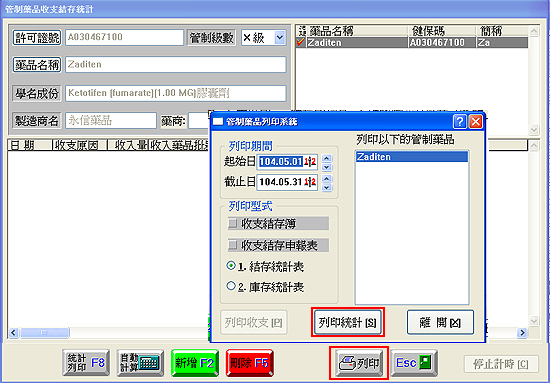
     
     
    三、滑鼠左鍵點一下『列印統計』出現如下圖視窗,滑鼠左鍵點一下『轉Excel』
     
     
    四、滑鼠左鍵點一下『統計列印』,可選擇列印『輸出報表』或按下『轉Excel』電子檔
     
     
    五、按下『轉Excel』後會出現如下圖視窗,再按下『Excel』即可轉出統計報表的電子檔
     
    Copyright © Shang Chan Information Services All Rights Reserved. | Design by cynet