
• 診所病歷e化
  • 醫聖診療系統軟體特色
  • 簡訊傳送系統
    使用者IP位置 216.73.216.59

    軟體操作

    醫聖預注上傳(同NIIS功能)如何新增四價流感疫苗使用品項

    分類:醫聖系統 日期: Warning: strtotime(): It is not safe to rely on the system's timezone settings. You are *required* to use the date.timezone setting or the date_default_timezone_set() function. In case you used any of those methods and you are still getting this warning, you most likely misspelled the timezone identifier. We selected the timezone 'UTC' for now, but please set date.timezone to select your timezone. in /volume1/web/content-detail.php on line 165 Warning: strtotime(): It is not safe to rely on the system's timezone settings. You are *required* to use the date.timezone setting or the date_default_timezone_set() function. In case you used any of those methods and you are still getting this warning, you most likely misspelled the timezone identifier. We selected the timezone 'UTC' for now, but please set date.timezone to select your timezone. in /volume1/web/content-detail.php on line 165 Warning: date(): It is not safe to rely on the system's timezone settings. You are *required* to use the date.timezone setting or the date_default_timezone_set() function. In case you used any of those methods and you are still getting this warning, you most likely misspelled the timezone identifier. We selected the timezone 'UTC' for now, but please set date.timezone to select your timezone. in /volume1/web/content-detail.php on line 165 Warning: date(): It is not safe to rely on the system's timezone settings. You are *required* to use the date.timezone setting or the date_default_timezone_set() function. In case you used any of those methods and you are still getting this warning, you most likely misspelled the timezone identifier. We selected the timezone 'UTC' for now, but please set date.timezone to select your timezone. in /volume1/web/content-detail.php on line 165 2019-10-29

    版本需求:執行醫聖最新版本9.0199以上或108/11月最新藥價檔更新
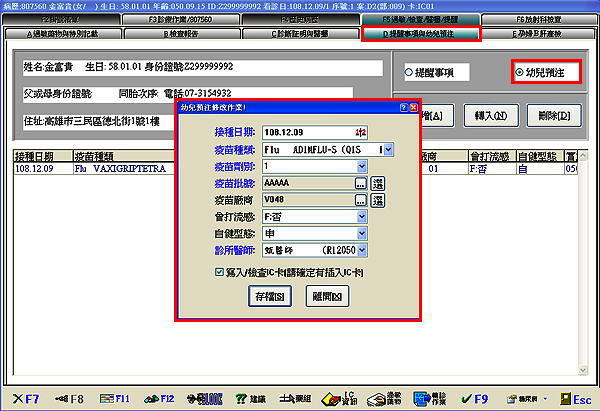
    增公費疫苗接種申報用注射針劑代碼且配合預注系統上傳使用操作說明

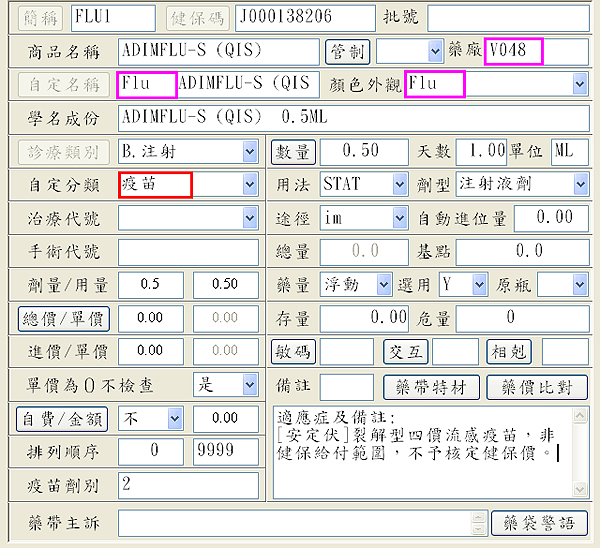
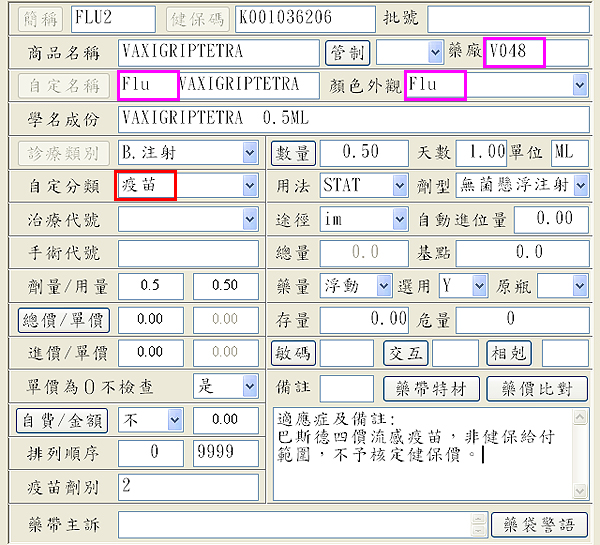
    於『藥品資料』作業畫面,按下『新增F2』

    (1)『簡稱』輸入自定名稱,於『健保碼』輸入公告核定疫苗藥品代碼(按此開啟連結)後,
      按下鍵盤『Enter』自動帶出相關資料。
    (2) 於『自定分類』欄位輸入或點選『疫苗』,接著按下『存檔 F9』 完成。
    注意!請確認『藥廠』欄位需為『V048』; 『用法』欄位必填
      『自定名稱』為『Flu   』;『顏色外觀』為『Flu
      【粉框處欄位為疫苗設定格式請勿任意更改,以免預注上傳系統無法正確抓取!】



    相關檔案下載:醫聖系統疫苗預注上傳操作說明 


    延伸閱讀

    疫苗接種匯入資料縣市政府自購(-HB)疫苗型別要轉3如何操作

    預注『疫苗批號』及『疫苗廠商』欄位如何使用選單簡化登打作業

    D2案件:108年度流感疫苗接種計畫操作說明

    Copyright © Shang Chan Information Services All Rights Reserved. | Design by cynet